RFID/NFC reader

AXON Reader EV3RFID/NFC reader for access control

AxonReader EV3 CANRev 0.22Ready for use

AXON Reader EV3 connects the card to the access control system over CAN. An onboard antenna, audible and visual feedback, and a local contact bring the interaction to the entrance, door or elevator panel.

RFID/NFCCard reading
CANConnection to the system
Buzzer + LEDFeedback at the reader
1 × SSRLocal contact

Present the card where access begins.

For the user, access starts at the reader. Within the installation, this point brings together the card, audible and visual feedback, and communication with the master.

Building entranceIdentification for shared spaces

Place the reader near the entrance used by residents and staff every day. The card profile and permissions are defined in the system configuration.

ElevatorsCard reading beside the cabin panel

The reader obtains the card identity, while the master and nodes connect permissions to floor signals. Position and enclosure are planned around the panel.

Shared doorsA reader for each access area

Offices, storage rooms and technical areas may be assigned to different user groups. The reader brings card identification close to each entrance.

See how it connects to the system
AXON Reader EV3

The RFID reader that brings access control to the user.

At a building entrance or elevator panel, users need a clear interaction: present a card and receive a response. AXON Reader EV3 is the RFID/NFC reader in the AXON family for that interaction, with its antenna, reader electronics and CAN connection on one board.

The reader works as part of the access control installation. It obtains the card identity; the master coordinates control, while local contacts or output nodes interface with the equipment. This division of roles is useful in buildings with several entrances, floors and areas with different permissions.

The buzzer and LED indicators provide audible and visual feedback at the reader. A local SSR contact, tamper input and service interfaces support integration into an enclosure. Cards, mounting and communication settings are selected together so the reading point suits everyday use.

The same reader can serve a landing, building entrance, door, garage or barrier access point. It communicates with a master located inside or outside the elevator cabin, alongside compatible relay nodes on the same CAN lines. Each master supports up to 240 addressed readers and nodes and stores up to 1,000,000 cards; those capacities belong to the master-managed system.

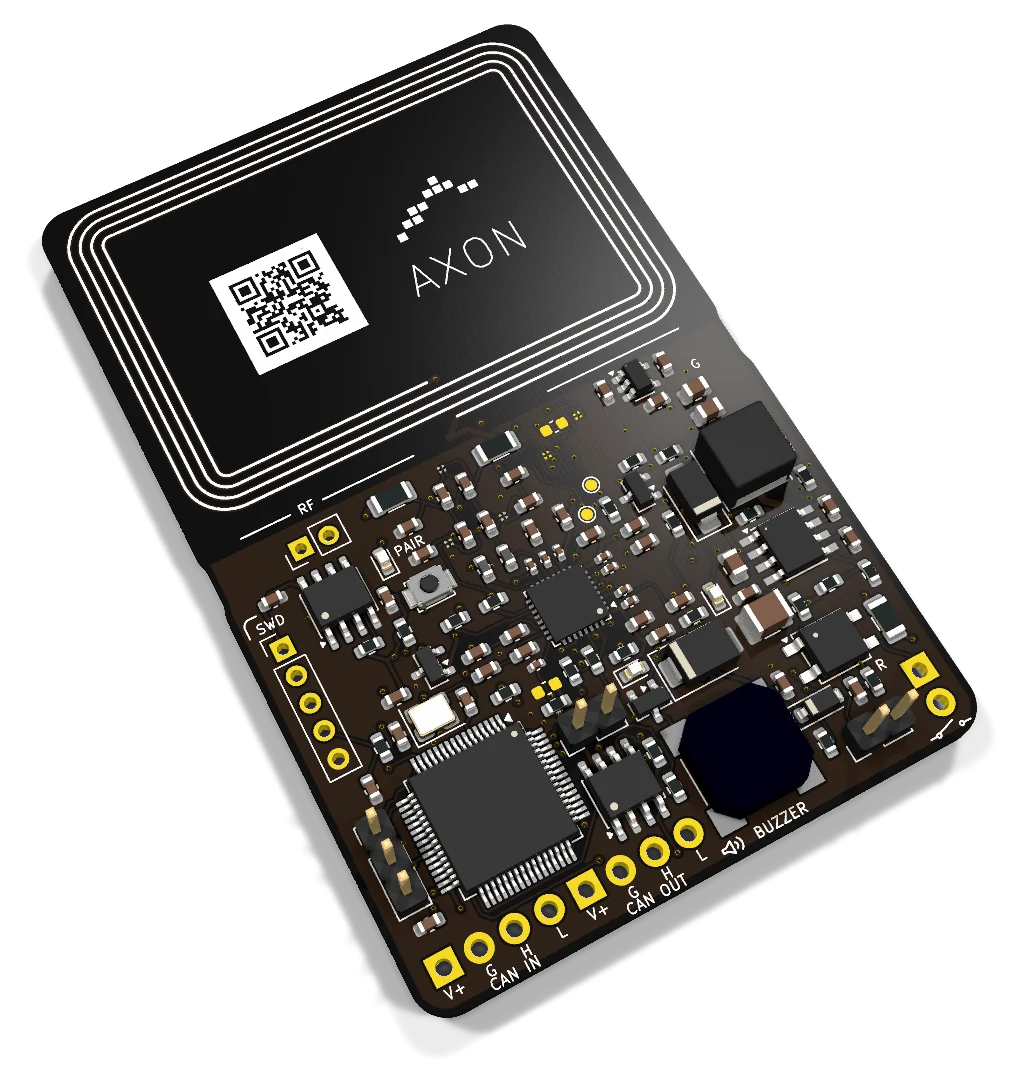
Angled view of the actual board AXON Reader EV3
AxonReader EV3 CAN · Actual PCB

From presenting a card to requesting access.

Reading, authorisation and control are separate steps. Their configuration determines what happens when someone presents a card.

The card interacts with the reader

The user holds a card near the reading area. The antenna and RFID/NFC electronics interact with the selected card profile. The reader should be visible and within easy reach of the people using the entrance.

Reader EV3 has an integrated antenna for card interaction. Cards are selected to match the profile supported by the configuration, including the identification method and information required for the access request.

The identity is checked against permissions

Reading a card and authorising entry are separate steps. The system links the credential to a user and their permitted access points: a building entrance, floor, door or service area.

The master has the central role in the AXON architecture. The reader communicates over CAN; access rules and information exchange are defined by the firmware and system configuration. The reader provides the physical identification point.

The equipment receives the relevant command

Once the request is processed, a suitable contact interfaces with the equipment’s control input. The contact may be at the master, on an output node or, depending on the configuration, on the reader itself.

For an elevator, the panel signals are reviewed. For a door or garage, the relevant controller interface is assessed. Selection covers the complete access path, from the card to the control signal.

Reading points for elevators, doors and shared entrances.

Reader placement follows the way people move through a building. One property may have several identification points, each serving different users and mounting conditions.

Beside the elevator panel

Inside the cabin, the reader can sit beside the panel used by passengers. Identification is linked to floor permissions, while the master and assigned outputs interface with panel signals. Passengers have a clear place to present their card.

Available panel space, the material in front of the antenna and the cable route are considered together. The access system controls permission to request floors; elevator movement, braking and safety functions remain with the elevator equipment.

The entrance people use every day

At a shared entrance, the reading point should be easy to recognise. Residents, staff and service providers can present cards according to the building’s rules, with audible and visual feedback configured for that point.

The reader is mounted in an enclosure suited to its location. Accessibility, lighting, the mounting surface and physical cable protection are considered for the way the entrance will be used.

Office doors and technical rooms

An office, storage area or technical room may require different permissions from the main entrance. Positioning the reader beside the door connects the card interaction to that specific access point and makes the separation of areas clear.

The installer defines the interface to the door controller, lock power supply and exit arrangements. The reader provides identification, while the other equipment provides control and the functions required by the door. Administration responsibilities are set for the user group.

Identification at the garage entrance

Reader EV3 can provide card identification in a garage access configuration when the user presents a card close to the reader. Its position is chosen around the entrance layout, stopping space and automation interface.

Planning covers the enclosure, power supply and system connection. The command reaches a suitable input on the gate or barrier controller; the motor and sensors remain part of the automation. Position the reader so users can comfortably present their cards.

Choose the card and enclosure together with the reading point.

Card compatibility and antenna placement directly affect the user interaction. Both are selected for the specific Reader EV3 configuration.

Define the card profile

If the building already uses cards, gather their specifications and how they are used. For a new installation, choose the card profile alongside user management, enrolment and access rules.

RFID/NFC describes the reading interface. Compatibility requires the card, firmware and configuration to support the same profile. An NFC-equipped phone is not automatically a supported access credential.

Allow space around the antenna

The antenna is built into the reader board, so nearby materials and components are considered when choosing the enclosure. Metal panels, screws and cable placement can affect the conditions for card interaction.

The mounting plan defines the board orientation and the surface where users present a card. Antenna configuration and checks with the final enclosure help determine the position. Reading range depends on this combination and the card used.

Make the interaction easy to understand

People should be able to see where to present a card without needing repeated instructions. Plan the reading-area marking, enclosure orientation and indicator visibility together, especially when fitting the reader inside an existing panel.

At entrances used by many people, define what the light and sound responses mean. Clear, consistent explanations help residents and staff distinguish card presentation from the outcome of the access request.

The reader, master and nodes each have a distinct role.

CAN communication connects the identification point to the AXON architecture. The master and nodes are selected to match the interfaces and protocol of the configuration.

CAN IN and CAN OUT continue one bus

Both Reader EV3 connections use the same CAN lines. CAN OUT continues the cabling where the installation topology requires it; it does not provide a second independent channel or a backup communication path.

Reader EV3 uses Classic CAN. The bus plan defines the devices, cable route and termination at the relevant ends. Reader count is determined by the protocol, cabling and power supply, together with the other nodes on the same bus.

The master coordinates the installation

The card-reading point may be some distance from the control cabinet. CAN lets the reader sit close to users while the master remains the central controller. Interface and firmware compatibility are established for the chosen combination.

Master Lite has one CAN bus; Master Premium has two isolated CAN channels. The choice depends on the building layout, power supply and required connections. The reader remains the identification point in the selected configuration.

A master outside the cabin can serve this reader at the landing and relay nodes inside the cabin through the same compatible lines. The layout follows the available wiring and avoids requiring a different controller type for each location.

Nodes add contacts where they are needed

A reader provides an identification point, while the installation may require several control signals. In the modular architecture, output nodes provide those contacts near the panel or equipment receiving the command.

AXON Node8 offers eight SSR contacts for electronic button signals. The number of nodes follows the actual access points and interfaces. Reader, contact and door counts are separate considerations in the system plan.

Feedback for the user, with a local contact interface.

Light, sound and the output interface form part of the access point. Their behaviour is configured around the way the system will be used.

LED indicators for visual feedback

An indicator near the card area helps users follow the interaction. Reader EV3 includes LEDs for this purpose. They should be clearly visible through the enclosure, with their meaning defined in the configuration.

Colour or illumination patterns can be used according to the functions implemented in the firmware. The reader indicator represents a state assigned by the system; it is not itself a sensor confirming that a door has physically opened or equipment has moved.

A buzzer for audible feedback

Sound can complement the light when a user is looking at the card or panel. The onboard buzzer provides this option. The sound and its timing are configured for the interaction and should be distinguishable at the point of use.

At an entrance or inside a cabin, sound is considered alongside the surroundings and enclosure. The signal should have a clear meaning for residents and the service team, according to its configured function.

An SSR contact beside the reader

The board includes one local SSR contact. It provides an electronic interface to a suitable equipment input when the configuration calls for control close to the reader. Electrical requirements and use are determined by the external signal.

The contact does not supply power to a lock or motor. Power equipment has its own interface and protection, with the reader signal integrated into that arrangement. The installer documents the contact connection and the equipment receiving the command.

Power, enclosure and device identity.

A reading point depends on both the device and its installation. Reader EV3 includes electrical protection and functions that are complemented by the enclosure and system configuration.

Protection at the power and communication connections

The local power input includes protection against reverse polarity and transient pulses, while the CAN interface has electrostatic discharge protection. These measures apply at the points where the reader connects to the installation cabling.

Plan the power source, return path and cable route alongside the devices on the bus. The enclosure and mounting complete the protection of the electronics according to the surroundings and how the access point is used.

A tamper input for the enclosure mechanism

The tamper input allows an enclosure mechanism to report its state. The connection is planned around the housing and mounting method, for example where the installation needs to detect a cover being opened.

Signal processing, logging and notifications are defined by the system and platform configuration. The required response is specified for the way the reader is used in the building.

Device identity and access rules

Reader EV3 includes support for device identity and cryptographic functions according to the configuration. These relate to how the reader is integrated and communicates in the selected system.

User access is defined through the card profile, authentication method and permissions for each entrance. Managing these choices is part of the complete solution, together with the master and platform.

One card, with permissions for the places and times that matter.

The reader provides the point of identification. The master and platform manage who may use it, when, and which access point receives the command.

Schedules, validity and advance notice

Administrators assign cards to selected entrances, floors, doors, garages and barriers, with schedules and validity periods. Payment-linked access can be configured for specific points; when validity or the payment deadline expires, access is blocked at the points the administrator selected.

Residents receive advance notice on their phones. Reader EV3 identifies the card; the platform manages payments and the master applies the rule. At an emergency exit, restrictions apply to entry only, while escape and emergency release remain free.

Live updates and remote reader control

Card and permission changes are distributed across connected masters in real time. An administrator can deactivate a selected reader remotely, without deactivating every reader in the building. A remote change requires the master and reader to be connected.

Reader-to-master communication is encrypted, as are the master’s cloud links. Local diagnostics reached through the master help the installer inspect the reading point. Card technology and the supported credential profile remain separate compatibility choices.

Plan the cards, reading points and ongoing service.

A clear description of users and existing equipment helps determine the reader, master and mounting arrangement.

Administration starts with the user

Define who receives a card, which spaces they can access and who manages changes. When a card is lost or a user leaves, the building procedure should cover permission updates and how those changes reach the system.

The reader is the physical point where a card is presented. User enrolment, validity and configuration distribution belong to system administration. A shared understanding of these roles helps the administrator and technical team during service.

Document every reading point

For each entrance, record the location, enclosure, cards, CAN connection and equipment receiving the command. This connects the individual reader to its role in the building and makes checks or changes easier to discuss.

The QR code helps identify the device when organising and servicing the installation. Technical staff should have suitable access to connections without changing the antenna position or mounting that determines card interaction.

Plan your configuration with AXON

Tell us where users will present their cards, what equipment controls the entrance, and whether cards or a master are already in use. Include the panel material, enclosure space and available cable route.

These details help select the reading profile, master, nodes and output interface. They also inform the responsibilities for administration and ongoing service at the building.

Project budget

Pricing and configuration

Considering AXON Reader EV3 for your project? Compare economical and Premium configurations, then adjust the budget for elevators, access-controlled landings, doors, garages and credentials.

One-elevator system · inside or outside
100 €+
One-elevator system · inside and outside
200 €+
Cards / tokens · each, wholesale
3 €+

Indicative starting prices for system configurations. Your project quote specifies the selected boards, equipment, installation and services.

Specifications: AXON Reader EV3

Interfaces and applications
RoleRFID/NFC reader in the AXON family
ReadingRFID/NFC with an integrated antenna
CommunicationClassic CAN; IN/OUT on the same bus
FeedbackBuzzer and LED indicators
Local output1 × SSR contact interface
Additional inputTamper
ProtectionPower-input protection and ESD protection on CAN
IdentificationQR code for installation records and service

Practical questions

What is AXON Reader EV3?
It is the RFID/NFC reader in the AXON family, with an onboard antenna, Classic CAN connection, buzzer, LEDs and one local SSR contact. It brings identification to an entrance, door or panel. Card profiles and system behaviour are defined in the configuration.
Does the reader replace the master?
The reader and master have different roles. Reader EV3 obtains the card identity and communicates with the system. The master coordinates access control, while local contacts or nodes interface with the equipment. The combination is selected for the installation’s interfaces and firmware.
Does it work with every RFID card or NFC phone?
Select the credential, reader and supported configuration together. AXON offers Apple Wallet and Google Wallet access workflows for compatible phones, watches and reader configurations. Existing cards and the intended mobile devices are assessed when choosing the installation.
How is access security configured?
The card profile, authentication method and permissions are defined for the specific system. The reader includes support for device identity and cryptographic functions according to the configuration. Card administration, mounting and master integration are part of the same solution.
Are CAN IN and CAN OUT separate networks?
Both connectors share the same Classic CAN bus. CAN OUT continues the cabling where required. This differs from the independent CAN A/B channels on Master Premium. Termination and device count are determined by the installation topology.
Can it be used for elevator access control?
It can provide the identification point near a panel or entrance, with the master and outputs completing the access configuration. Card profiles, the enclosure, cabling and panel signals are assessed together. The reader does not replace the elevator’s motion controller or safety functions.
What is the local SSR contact used for?
The local SSR contact interfaces with a suitable electrical input close to the reader. Its use and electrical requirements are checked for the connected equipment. It does not directly power a lock, motor or mains-powered load.
What do the LEDs and buzzer indicate?
They provide visual and audible feedback at the reader. The meaning and timing of the signals are defined in the firmware and configuration. A light or sound alone does not confirm that a door has opened; physical state requires the relevant information from the installation.
Does the enclosure affect card reading?
Yes. Material in front of the antenna, metal parts and mounting position are considered when choosing the reading location. The final enclosure is assessed together with the card and board orientation. Reading distance depends on this combination.
Can it be mounted at an outdoor entrance?
Placement requires an enclosure and installation conditions suited to the environment. The board specification does not declare an IP rating or weather resistance. Position, humidity, temperature, cabling and materials near the antenna are assessed as part of the complete mounting solution.
What does the tamper input do?
It can receive a signal from an enclosure mechanism, for example when a cover is opened. The response is defined in the firmware and platform integration. The hardware input alone does not imply an alarm, notification or a particular system action.
What information is needed to select the reader?
Describe the entrances, users, existing cards and equipment that will receive the commands. Include the existing master, if any, the cable route, panel material and enclosure space. These details help the AXON team select the reading profile and system configuration.
Can a reader be deactivated remotely?
Yes. The administrator can deactivate a selected reader through the platform. The change reaches a connected master and reader; it cannot be delivered to a disconnected device until communication returns.
Where are the card records stored?
The master stores up to 1,000,000 cards and manages up to 240 addressed subordinate devices, including readers and nodes. Reader EV3 provides identification at an access point; these capacity figures are not standalone storage or output counts for the reader.
Let’s plan your system.

Tell us where cards will be used, which entrances you want to manage and what equipment is already installed. Together, we can select the readers, card profile and connection to your AXON system.