Expansion node

AXON Node8CAN expansion node with eight SSR outputs for access control

AxonNode8 CANRev 0.9Ready for use

AXON Node8 adds eight SSR contacts to an AXON access control system, close to the panel or device receiving the command. CAN communication, individual channel indicators and monitoring functions help organise outputs for elevators, doors and garages.

8 × SSRContact outputs
CANConnection to the master
8 × LEDChannel indicators
MonitoringPower and output control

Extra contacts, close to where they are needed.

When the master needs more outputs, an expansion node brings the additional contacts to the equipment receiving the signal. Identify the control points, then organise them in groups of eight contacts.

ElevatorsMore channels for panel signals

When an elevator panel needs more channels, Node8 adds eight contacts for electronic button inputs. The number of nodes and channel assignments depend on the installation.

DoorsA contact near the door controller

The node can place the control signal close to a door controller. Its output connects to a suitable electronic input; the lock is powered through its own power interface.

GaragesConnection to the control input

At a garage entrance, the contact can connect to a suitable input on the existing controller. The motor and its protection circuits remain part of the garage automation.

See how it connects to the system
AXON Node8

More outputs, with a clear role in the system.

An elevator panel may need more signals than the master provides locally. Elsewhere in a building, contacts may be needed near a group of doors or the garage automation. AXON Node8 adds eight electronic SSR outputs and places this part of the installation close to the equipment being controlled.

The node communicates over CAN within a system managed by the master. The reader handles the RFID card, the master coordinates access control, and Node8 provides the additional contacts for button signals. Identification points, the central controller and outputs can therefore be positioned to suit the building and its cabling.

Each channel has its own terminals and visual indicator. The node includes local power protection and output-control monitoring functions, used according to the configuration. Installers get a clearly identifiable group of outputs, while the building gains a modular way to add control points.

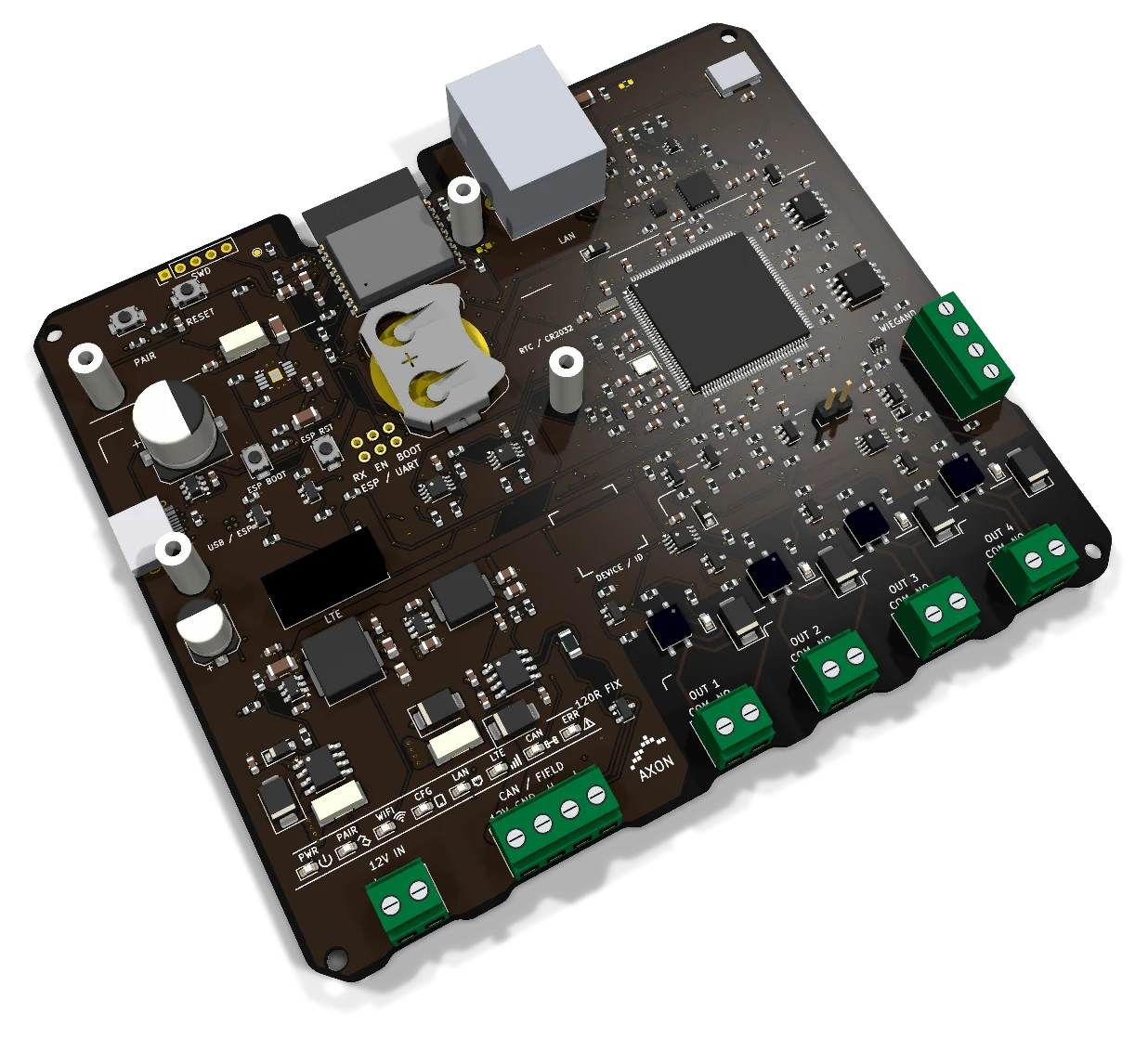
Angled view of the actual board AXON Node8
AxonNode8 CAN · Actual PCB

The reader identifies. The master coordinates. The node switches.

A simple card interaction involves several devices with different roles. Node8 provides the electronic contacts close to the points where an access command needs to be applied.

The user presents a card

A resident or employee holds a card near the reader. The RFID/NFC reader obtains the credential information supported by the card profile and connects that interaction to the access control system.

Node8 complements the reader and master with additional outputs. The reader can sit where the user needs it, while the contacts sit where the equipment signals are connected.

Permissions are assigned to access points

A card can be assigned to the building entrance, a group of floors or specific areas. These rules are set through the administration and configuration of the system managed by the master.

Each access point is also assigned to an output. A clear record of the area, node and channel helps both the installer making the connections and the team responsible for ongoing maintenance.

Node8 provides the control signal

The node has eight SSR contacts for electronic button inputs, nominally 12–24 V DC. Each assigned channel connects to the corresponding signal on the panel or equipment controller.

This brings the command to the required location without placing the entire master beside every output group. Channel assignments and use depend on the actual interface in the installation.

Expand the elevator panel, door controls and garage access.

Node8 adds contacts for electronic signals. Planning starts with the control input of the existing equipment and the number of signals it requires.

More channels for elevator access control

In an elevator access control system, user permissions determine which floors are available. When a panel needs more contacts, Node8 units can organise the signal groups according to their number and location.

The connection is planned around the specific panel: the signal expected by the buttons, terminal positions and channel assignments. The node interfaces with access signals; elevator movement and safety functions remain with the elevator system.

A contact close to the door controller

For an entrance or group of doors, the node can sit beside the controllers receiving the commands. This is useful when the readers and central control cabinet are in different parts of the building.

The SSR output connects to a suitable electronic input. The lock requires its own supply and power interface. Contact requirements, exit buttons and other entrance functions are assessed for each door.

A signal for the garage gate or barrier

In a garage, Node8 can bring the control contact close to the existing automation. Readers and access rules are configured in the rest of the system for the users who are allowed to enter.

The contact connects to a suitable input on the gate or barrier controller. Motor power, sensors, stopping and protective functions remain with the equipment automation.

Add contacts where the installation needs them.

A modular installation starts with a master and expands through nodes. Node positions follow the panel, entrances and cable routes, with clear labels for each output group.

When the master needs more local outputs

Master Lite has four local SSR outputs, while Master Premium has two. Node8 adds a group of eight contacts to the CAN architecture when the installation needs more control signals.

The master and compatible nodes are selected as part of the system configuration. Communication layout also differs between the masters: Lite has one CAN bus, while Premium has two separate channels.

Nodes beside panels or entrance groups

One contact group can sit beside the elevator panel, with another near equipment in a different area. This divides the installation into identifiable groups in the wiring plan.

Document the position of each node and the purpose of every channel. Expansion planning also covers power, the bus, mounting space and the interfaces of connected equipment.

Distributed nodes or a controller with many outputs

Within the AXON family, the CCU-32 cabin controller brings many outputs together in one unit. A modular master with Node8 allows contacts to be distributed across nodes to suit the installation.

The same modular master can sit inside or outside the elevator cabin. When the master is outside, cabin output nodes can share compatible CAN lines with landing readers, entrances, garage access and barriers. Node8 provides eight SSR outputs at the panel, so a separate master type is not needed just because the contacts are inside the cabin.

One CAN bus, with an input and a continuation connection.

Node8 uses Classic CAN to communicate with the system. CAN IN and CAN OUT continue the same communication pair from one device to the next.

IN and OUT share the same bus

CAN IN and CAN OUT continue the same communication bus. They help organise cabling along a group of devices and do not create two independent channels in the node.

The installation plan defines the bus route and each node position. Connector labels make the cable path easier to follow during installation and service.

Termination belongs at the physical ends

The CAN bus requires termination at its two physical ends. If Node8 is at one end, termination is set for that position. Nodes between the ends keep it disabled.

The actual cable route determines the termination points. Adding or moving a device can change the end of the bus, so termination is reviewed whenever the physical layout changes.

Plan communication and power together

The CAN line carries communication; a 12–24 V DC supply powers the node. Cable and power-supply choices are made alongside device placement.

Each master supports up to 240 addressed subordinate units, including readers and output nodes. Node8 contributes eight SSR contacts per node; other node variants have eight or more outputs according to their model. This device limit is separate from relay count, and the actual cabling, bus segments and power budget must suit the connected equipment.

Eight contacts, with an indicator beside each channel.

The outputs connect the node to external equipment. Individual terminals and indicators help match each command to the channel recorded in the installation plan.

SSR contacts for electronic button signals

Each channel provides an electronic SSR contact with its own terminal pair. The intended use is interfacing with electronic button inputs, nominally 12–24 V DC.

Check the receiving equipment’s signal requirements before making the connection. Output count alone does not determine the number of doors or floors: an access point may need a different arrangement of signals.

An LED helps trace the command

Each channel has a visual indicator. During connection and diagnostics, the installer can match the command to the correct channel and its label in the documentation.

The LED indicates activation of the SSR drive. It does not measure contact closure, door opening or the panel’s response. Those states are checked through the relevant equipment and interface.

A clear record of all eight channels

The building documentation should identify the signal connected to each channel, its cable route and the access point it serves. This makes the output group understandable to the service team.

Unused contacts can also be recorded in the installation documentation. Any later expansion is assessed against the electrical requirements of the new equipment and the system configuration.

Power protection and output-control monitoring.

Node8 includes power and communication protection, together with functions for monitoring output control. These support its role within the AXON system.

Local protection at the power input

The power input includes local protection against reverse polarity and transient pulses. These measures protect the node’s interface with the installation’s power supply.

Plan the power source, cables and device loads along the line together. Local protection complements that design, while the supply is sized for all connected devices.

ESD protection on the CAN interface

The CAN interface includes protection against electrostatic discharge. This complements installation measures at the connections between the node and the rest of the system.

Plan the cabling, termination and electrical grounding together. A clear layout makes the communication path and the connections to check at each node easier to follow during installation and service.

Monitoring power and output control

The node includes dedicated functions for monitoring operation and output control. They form part of the device design and are used according to the system configuration.

Supply monitoring supports this role. Behaviour during changes in communication or power is defined for the installation, together with the required response at the access point.

The master sets the rules. Node8 applies the output command.

Card records and administration stay with the master and platform. Node8 provides the local signal interface, keeping the same node useful at a cabin panel, entrance or garage controller.

Schedules and selected access points

The platform assigns schedules, card validity and payment-linked permissions to selected access points. When a validity or payment deadline expires, the master applies the restriction to the points chosen by the administrator. Residents receive advance phone notifications.

Node8 executes the corresponding output command. It does not store the master’s one-million-card database or collect payments. Its eight contacts retain their role as electronic signal interfaces, not power outputs for locks or motors.

Remote control of a selected node

An administrator can remotely deactivate a selected subordinate node through the AXON platform. Changes are distributed in real time while the master and target device are connected. Local diagnostics through the master help the installer inspect the relevant node.

The node-to-master link is encrypted, and the master handles encrypted cloud communication. For an emergency exit, access rules may restrict entry only; escape and emergency release remain free.

Plan the outputs now, and their maintenance later.

A well-documented node is easier to connect, identify and maintain. Preparation starts with equipment signals and continues through placement, cabling and channel labelling.

Prepare a list of signals

List the panels or devices that will receive commands, the number of electronic inputs and their electrical requirements. Then determine which contacts can be grouped on the same Node8.

For an elevator, gather the panel details. For a door or garage, identify the interface on the existing controller. These details are more useful for planning than the number of floors or entrances alone.

Link each node’s identity to its location

Record every node’s location and assigned channels. The QR code on the board helps identify the device when organising and servicing the installation.

The configuration procedure is defined for the system. Keep a record linking the node’s identity, physical position and the eight channels it serves.

Review the complete installation when expanding

When control points are added, review node locations, the CAN route, termination and power supply. The building management team and installer agree on the changes to operation and cabling.

Tell us which master and equipment you have, and which contacts you need. We can define the number of nodes and output assignments so the configuration is clear during installation and service.

Project budget

Pricing and configuration

Considering AXON Node8 for your project? Compare economical and Premium configurations, then adjust the budget for elevators, access-controlled landings, doors, garages and credentials.

One-elevator system · inside or outside
100 €+
One-elevator system · inside and outside
200 €+
Cards / tokens · each, wholesale
3 €+

Indicative starting prices for system configurations. Your project quote specifies the selected boards, equipment, installation and services.

Specifications: AXON Node8

Interfaces and applications
RoleExpansion node for an AXON master
Outputs8 × SSR
Output useElectronic button signals, nominally 12–24 V DC
CommunicationClassic CAN; IN/OUT on the same bus
Power supply12–24 V DC, with local protection
IndicatorsIndividual output and status indicators
MonitoringPower and output control, according to configuration
IdentificationQR code for installation records and service

Practical questions

What is AXON Node8?
AXON Node8 is an expansion node with eight SSR contacts for an AXON access control system. It communicates over Classic CAN and adds outputs close to the panel or device receiving the control signal. Each channel has its own terminals and visual indicator.
Does Node8 replace the master or RFID reader?
Node8 is the output expansion node. The reader obtains the card identity, the master coordinates the system, and the node adds contacts for equipment signals. It operates as part of a system managed by the master.
Do eight outputs mean control of eight doors or floors?
Not automatically. The eight outputs are eight electronic contacts. The number of access points depends on the signals each device requires and the way channels are assigned in the installation.
Which signals can the SSR outputs handle?
The outputs are intended for electronic button inputs, nominally 12–24 V DC. Check the input requirements of the external equipment before connecting it. A button signal and a power load have different electrical requirements.
Can I connect a lock or motor directly?
Node8 contacts provide the control signal. Locks, coils, motors and mains-powered loads require their own power interface, supply and protection. The connection is designed around the equipment controller.
Are CAN IN and CAN OUT separate channels?
Both connections continue the same CAN bus. Master Premium has a different arrangement: CAN A and CAN B are two separate communication channels.
Should termination be enabled on every Node8?
Termination is set only at the two physical ends of the CAN bus. Nodes between the ends keep it disabled. The actual cable route determines the termination points, which are reviewed when devices are added or moved.
Does the LED confirm that a door opened or equipment operated?
The channel indicator shows the SSR drive command. It does not measure the contact or confirm door opening, gate movement or a panel response. The external state is checked through the relevant equipment interface.
How is the node powered?
Node8 uses a 12–24 V DC supply, with local protection against reverse polarity and transient pulses. The supply and cables are sized for the devices in the installation.
What does node monitoring cover?
Node8 includes supply monitoring and functions for output control. Their use and the response to changes in communication or power are defined in the system configuration for the access point.
Can Node8 be installed inside an elevator cabin?
The same modular master can sit inside or outside the elevator cabin. When the master is outside, cabin output nodes can share compatible CAN lines with landing readers, entrances, garage access and barriers. Node8 provides eight SSR outputs at the panel, so a separate master type is not needed just because the contacts are inside the cabin.
What information is needed to choose the number of nodes?
Provide the signals to be controlled, equipment requirements, locations, master and cable route. Addressing, the bus and the power supply are then reviewed. Contact count is one part of sizing the system, alongside configuration compatibility.
Does the 240-device limit mean 240 outputs?
No. A master supports up to 240 addressed subordinate devices, including readers and nodes. Each Node8 provides eight SSR outputs. Other node variants have eight or more outputs according to their model; total outputs and access points are calculated separately.
Does Node8 manage payments or card validity?
The platform and master manage cards, schedules, payment deadlines and the access points affected by expiry. Node8 applies the assigned output commands. It is an expansion node, not a payment processor.

Let’s plan your system.

Tell us which signals you need to control and where the equipment is located. We can plan the Node8 units, eight-channel assignments, CAN connections and power supply for your system expansion.