Start with the credential, not its appearance
Cards and key fobs are convenient shapes for carrying a credential. Ask what the system verifies when someone presents one: a visible identifier, or a protected credential using authentication?
Reading a UID identifies a card's transmitted number. Cryptographic authentication verifies additional protected information through the configured credential profile. These are different operations; buying a card with authentication capabilities does not establish that the installed reader uses them. The SIA credential design guide makes this distinction when discussing identifier-only access and credential configuration.
Request a sample of the actual card or fob before ordering a batch. Agree who issues credentials, manages their configuration and replaces lost ones. A building administrator should be able to disable a missing credential without replacing every resident's card. Our guide to RFID cloning risk explains why the whole configuration matters.
Plan phone, watch and visitor credentials
AXON supports Apple Wallet and Google Wallet credentials for access from compatible phones and watches. Include the actual devices residents intend to use in the selection process. The credential, reader and system configuration are chosen together, so the demonstration should cover the intended entrance or elevator as well as the phone or watch.
Residents can also issue temporary QR codes or PINs for guests. Decide which entrance the visitor will use, where the visitor may go and when the permission ends. Select an entry device that supports the chosen method; a QR-reading point and a PIN-entry point have different user interfaces from a card-only reader.
| Credential choice | Useful selection check |
|---|---|
| RFID card or key fob | Demonstrate the selected credential and authentication profile. |
| Apple Wallet or Google Wallet | Demonstrate access with a supported phone or watch and the proposed reader configuration. |
| Temporary visitor QR or PIN | Demonstrate resident issuance, use at the chosen entry point and the end of the visit period. |
Camera and intercom integration helps identify visitors and authorize controlled entry. Map that workflow with the reader and door or gate command so the visitor has a clear way to request access. The AXON platform overview explains how these credentials and integrations fit into building administration.
Match the reader connection to the master
The radio connection between card and reader is separate from the wired connection between reader and controller. Check both ends, including supported firmware and data formats.
| Interface | What to establish before purchase |
|---|---|
| Wiegand | Accepted data format, electrical interface and the limitations of an unencrypted reader link. |
| OSDP | Support at both ends, supported features and whether Secure Channel is configured. |
| AXON Classic CAN | Compatible AXON reader, master, device configuration and bus installation. |
SIA describes OSDP as an interoperable reader-to-controller protocol with two-way communication and a Secure Channel option. It is a useful market comparison; it is not an AXON interface claim. Reader EV3 uses Classic CAN, not OSDP.
Support and activation are separate checks. For example, Axis reader documentation includes specific steps to enable and enforce OSDP Secure Channel. Ask the installer to demonstrate the intended communication configuration at handover, rather than relying on a protocol name on a quotation.
Check mounting and everyday use
An exposed entrance, a sheltered lobby and a metal elevator panel require different installation arrangements. Check the completed enclosure's documented environmental rating, operating temperature and mounting instructions. A bare PCB is not automatically an outdoor reader. For AXON Reader EV3, select the enclosure and location as part of the installation; do not infer a weather rating from its product name.
Try a credential at the intended mounting position. Metalwork, placement and the chosen credential can affect the experience. Check that users can reach the reader comfortably and understand its light or sound feedback. At a garage, plan where a vehicle stops so the driver can present the card without stretching across moving traffic.
Where AXON Reader EV3 fits
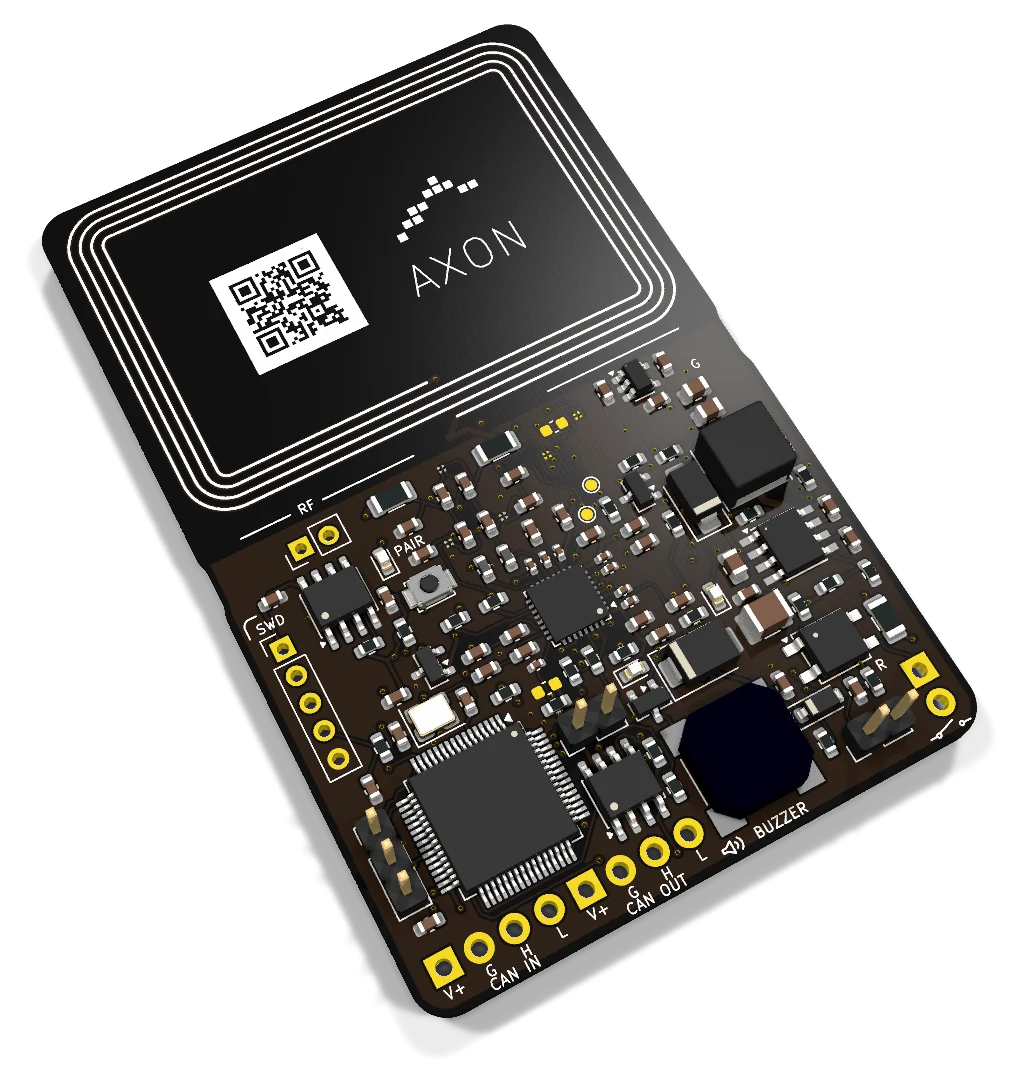
Reader EV3 combines an RFID/NFC antenna, light and sound feedback, a tamper input and a local SSR control contact. It connects to a compatible AXON master over Classic CAN. Its CAN IN and CAN OUT connectors continue one bus; they are not independent networks.
The current modular masters support up to 240 addressed subordinate devices, including readers and output nodes, and store up to 1,000,000 cards per master. Those figures describe different capacities: one reader is a device, while a Node8 provides eight control outputs. Wiring, power and device compatibility still need a site plan.
For the relationship between credentials, permissions and equipment commands, see how AXON works. The doors, garages and barriers guide applies that arrangement to practical access points.
The wider platform adds intelligent device monitoring and early alerts, with a dashboard for maintenance companies managing multiple buildings and elevators. AXON also provides hardware and firmware protection against unauthorized updates and intervention. Agree which installed devices the team will monitor and who will handle an alert or a maintenance visit.
Plan a migration that residents can follow
Start with an inventory of existing readers, controllers, cards and cable routes. Mark which credentials need to keep working during the changeover and agree a date for retiring the old configuration. Trial the proposed reader and credentials at one representative entrance before replacing the rest.
Master Lite includes a Wiegand input for compatible arrangements. Keeping an existing Wiegand reader may simplify a retrofit, but conversion does not encrypt its original connection or turn identifier-only card reading into authenticated access. Decide consciously whether that reader is a temporary migration step or a suitable long-term choice for the point concerned.
The acceptance check should cover allowed access, denied access, expired validity, lost-card replacement and the feedback residents see. Also check recovery after a controller restart or interrupted connection, using the intended site configuration.
Take this checklist to the installer
- Working card samples, the intended Wallet phone or watch, and any visitor QR or PIN workflow.
- Reader and controller models, firmware compatibility and interface details.
- Mounting position, enclosure, power supply and cable route.
- User feedback for permission granted, denied and device unavailable.
- Credential issuing, replacement and withdrawal responsibilities.
- A documented changeover plan and practical handover checks.
Compare complete arrangements when discussing cost. AXON's wholesale authenticated cards and fobs start at €3 per item, subject to configuration and quantity. Reader installation and related equipment are specified separately in the proposal; see pricing and scope.
Frequently asked questions
Can residents use Apple Wallet or Google Wallet?
Yes. AXON supports Apple Wallet and Google Wallet access credentials on compatible phones and watches. Select the supported credential, reader and system configuration together, and demonstrate the residents' intended devices during handover.
Can a resident send temporary access to a guest?
Yes. Residents can issue temporary QR codes or PINs. Plan the permitted access points, visit period and the compatible equipment where the guest will present or enter the credential.
Can the same card work at the entrance and elevator?
Yes, with compatible readers and credential configuration. The administrator can assign separate permissions to the entrance, garage and elevator access points, so carrying one card need not mean unrestricted access everywhere.
Does a CAN connection make any reader compatible with AXON?
No. The physical bus name is only part of compatibility. Select the supported AXON reader, master and device configuration together. Existing RS-485 readers and OSDP readers require their own supported system arrangements.
What should I send when requesting a reader recommendation?
Send the existing reader and controller models, a credential sample, the intended location and photographs of the enclosure and cable route. Ask AXON about the installation before ordering readers solely by appearance or frequency.